 Charge Line
The EV trip planner for Australia
Plan any EV road trip across Australia
Choose your car and where you're going. Charge Line picks where to charge, how long to charge for, and the battery you'll arrive with at every stop.
Coming soon on theApp Store
See how it works- Free, unlimited planning
- 226 car models
- Every major network


Three steps to your next road trip
No account and nothing to set up beyond your car. Charge Line does the maths on range, charging speed and hills, so you can just drive.
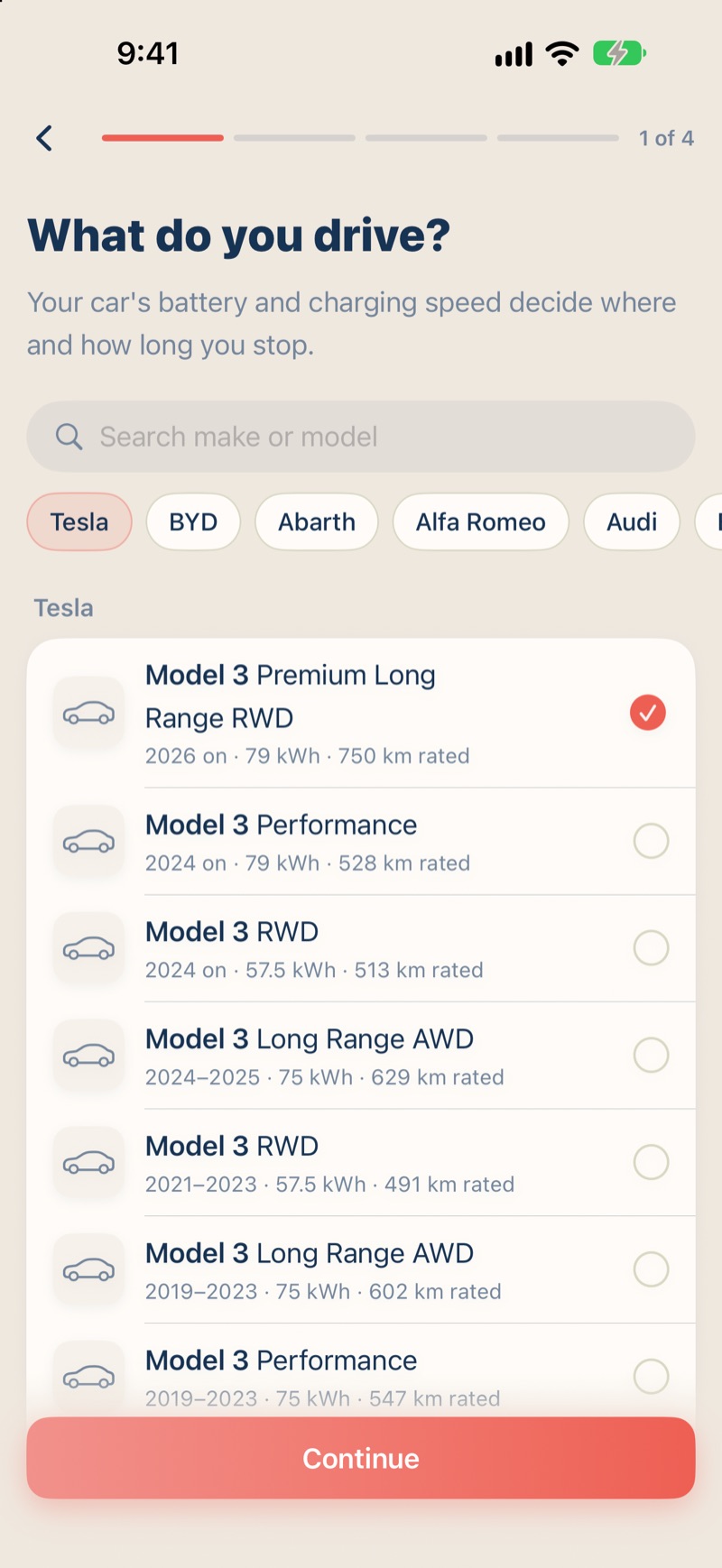
Step 1: Choose your car
Pick from 226 models sold in Australia. Its battery, plugs and charging speed shape every plan, and you can set how healthy your battery is today.
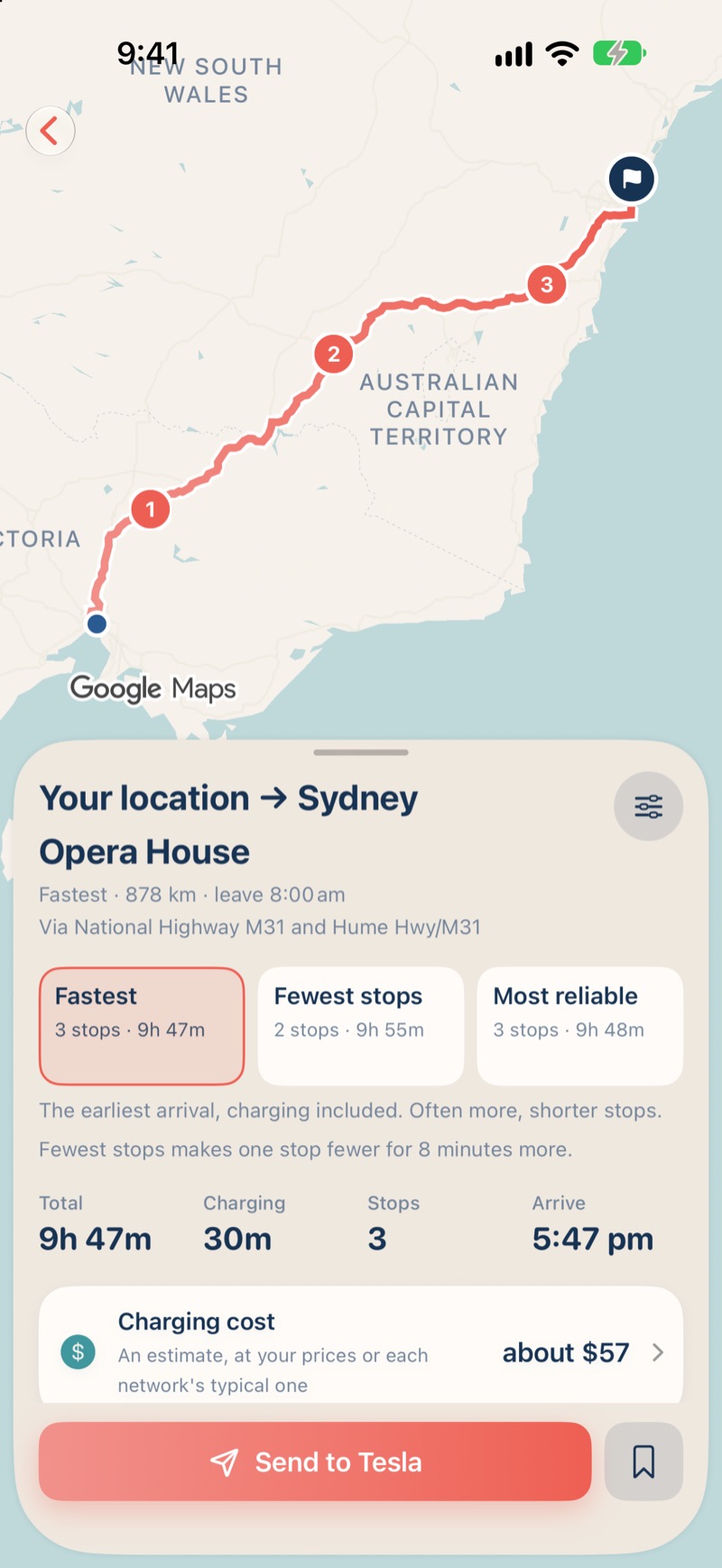
Step 2: Say where you're going
Charge Line plans the route and the stops, counting hills and highway speeds. Compare Fastest, Fewest stops and Most reliable side by side.
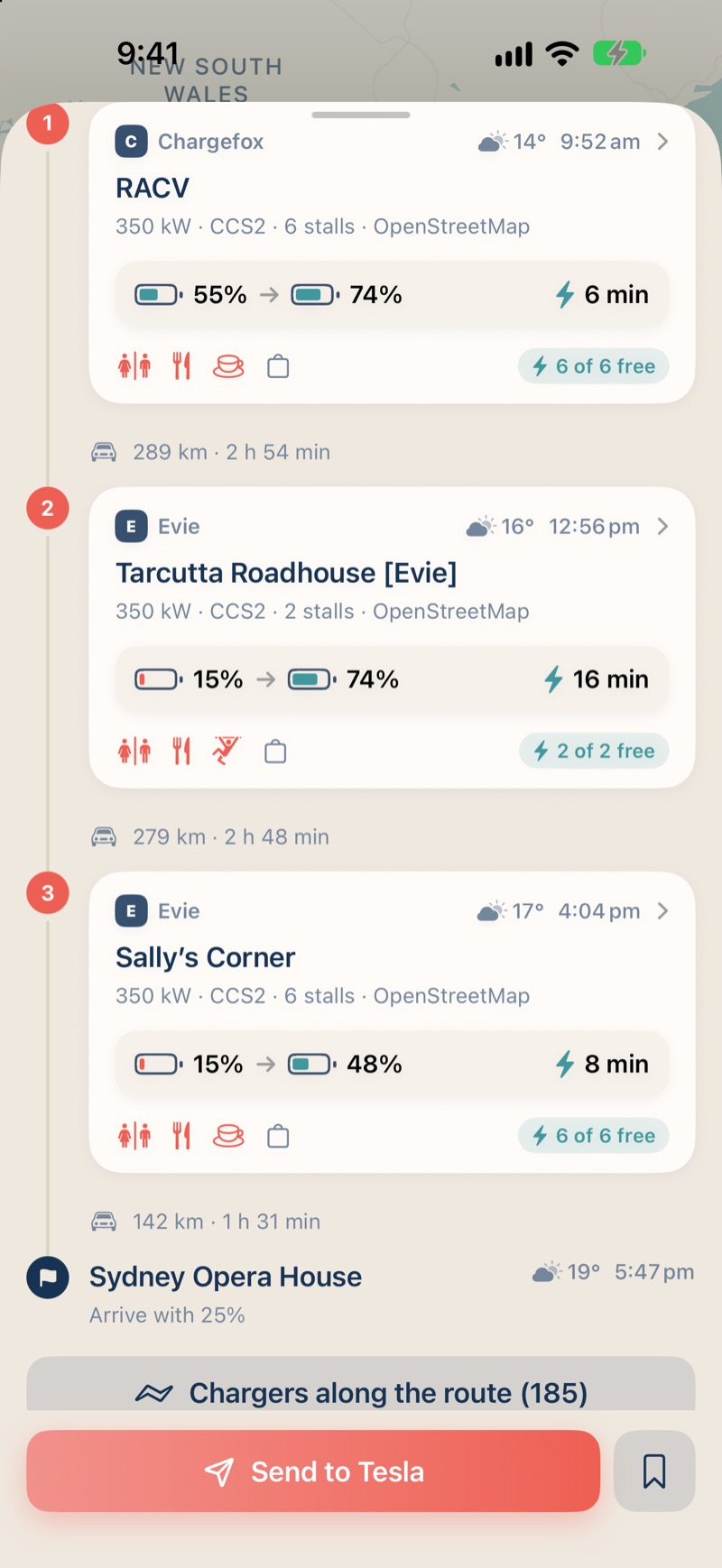
Step 3: Drive it, stop by stop
Every stop shows the battery you'll arrive and leave with, how long to charge, and the cafés, food and toilets within a short walk.

Free, as often as you drive
Unlimited trip planning and every safety warning cost nothing, for as long as you use the app. No account, no ads.
Unlimited trip planning
Charging stops chosen for your car's battery, plugs and range, counting hills and highway speeds. Plan as often as you drive.
Fastest, Fewest stops or Most reliable
See all three side by side. Most reliable keeps the next charger along in reach at every stop, in case one isn't working.
Somewhere to stop
Cafés, food, toilets and playgrounds within a short walk of each charging stop.
Warnings that matter
Told when a stop has no backup charger in reach, or when you'd arrive below your target. Safety warnings are always free.
Chargers near you
A map of chargers around you, with their power, plugs and what's nearby. Photos, opening hours and how to pay at each one.
Other drivers' reports
When someone last charged there, and what they paid. Tap It worked or It didn't to help the next driver: anonymous, no account.
Navigate in one tap
Send the whole trip to Google Maps, every stop in order, or each stop to Apple Maps. Tesla owners can send their destination to the car.
Your places
Home and Work shortcuts and your recent searches, kept on your iPhone.
Know the charger before you get there
Chargers near you on a map, with their power and plugs. Open one for its photos, opening hours, how to pay and what's within a short walk, and see what other drivers found.
- When someone last charged there, and what they paid
- Tap It worked or It didn't to help the next driver
- Anonymous: no account, nothing that identifies you


Drive a Tesla, or anything else
Plans work for any electric car sold in Australia. When it's time to go, hand the trip to the app you navigate with.
- Google Maps takes the whole trip, every stop in order
- Apple Maps takes it one stop at a time
- Tesla owners can send the whole trip to the car (Premium)
More for the longer drives
Live charger status, weather on the way and what the trip will cost, with CarPlay and your Tesla. Try it free for 7 days.
Live charger status
Free, in use or out of service at your charging stops, and a new plan around any charger that's down.
Weather on the way
The forecast at each stop and when you arrive, and plans that count headwinds, cold and rain.
What it will cost
What each stop and the whole trip will cost to charge, at each network's typical price or your own.
Your trip, your way
Add your own stops on the way, swap or remove charging stops, and set how much to charge.
Send it to your Tesla
The whole trip, every charging stop, straight into the car's navigation, and its battery read from the car.
CarPlay
The trip's charging stops and the chargers near you on your car's screen.
Plans that learn
Record how a trip went, and plans adjust to how your car really drives.
Unlimited saved trips
Free plans keep three saved trips. Premium keeps them all.
Weather on the way, counted in the plan
A headwind or a cold morning can use far more energy. Premium plans with the forecast for each part of the road at the time you'll drive it, and shows the weather at every stop and when you arrive.
- Temperature, wind and rain along the route
- What each stop and the whole trip will cost
- Live status, and a new plan around a charger that's down


Monthly
A$6.99a month
7-day free trial for new subscribers
Yearly
A$59.99a year
7-day free trial for new subscribers. About 28% less than monthly.
Road Trip Pass
A$4.99for 7 days
7 days of Premium for one trip. Doesn't renew.
Subscriptions are charged to your Apple Account and renew automatically unless cancelled at least 24 hours before the end of the current period. A free trial becomes a paid subscription at its end unless you cancel. Manage or cancel in your Apple Account settings. Your arrival battery, plan B and every other safety warning are free for everyone.
Unfold for the whole trip
On iPhone Duo, the trip sits beside the map: every stop on one side, the route on the other.

Every major network
Choose the networks you use, and plans stick to them. The charger list is rebuilt every day from OpenStreetMap and Open Charge Map.
- Tesla Supercharger
- Evie
- Chargefox
- Ampol AmpCharge
- BP Pulse
- NRMA
- Jolt
Questions
Anything else? See Support or email chargeline.app@gmail.com.
Is Charge Line free?
Yes. Planning trips is free and unlimited, with every safety warning. Free plans keep three saved trips. Premium adds live charger status, weather on the way, charging costs, your own stops, sending trips to a Tesla and CarPlay, for A$6.99 a month or A$59.99 a year (each with a 7-day free trial for new subscribers), or a 7-day Road Trip Pass for A$4.99.
Which cars does it work with?
Any electric car sold in Australia. Choose yours from 226 models across 47 brands, including Tesla, BYD, Kia, Hyundai, MG, BMW, Polestar and Volvo. Its battery, plugs and charging speed shape the plan, and you can set your battery's health.
Do I need a Tesla?
No. Charge Line plans trips for any EV, and hands the whole trip to Google Maps, or each stop to Apple Maps. Tesla owners can also send the whole trip to the car's navigation with Premium.
Which charging networks does it use?
Tesla Superchargers, Evie, Chargefox, Ampol AmpCharge, BP Pulse, NRMA and Jolt, and other chargers on the map. Choose the networks you use, and plans stick to them.
Where does the charger information come from?
Charge Line's list of Australia's chargers is built every day from OpenStreetMap and Open Charge Map, with photos, opening hours and ways to pay. Drivers' reports add when someone last charged and what they paid. With Premium, live status comes from Google Maps for networks that share it.
Do I need an account? What happens to my data?
No account. No ads and no analytics. Your car, trips and searches stay on your iPhone. The privacy policy explains what's sent to other services to plan a trip, and why.
Is it on Android, or outside Australia?
Charge Line is for iPhone (iOS 26 or later) and CarPlay, and plans trips in Australia only.
When can I get it?
Charge Line is coming soon to the App Store. Email chargeline.app@gmail.com with any questions.
Your next road trip, planned for your car
Charge Line is free on iPhone. Plan as often as you drive, and add Premium when the trip calls for it.
Coming soon on theApp Store